


1. Introduction
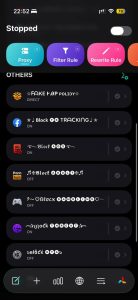
iAppleC Features Supported on Quantumult X
✩ᖴᗩKE ᎨᎯᏢ ᴘᴏʟɪɔʏ✩ : Unlock ViP App or Cheat iOS Game Resources (Always On)
✮♩𝗕𝗹𝗼𝗰𝗸 🅕🅑 TᖇᗩᑕKIᑎG♩✮ : Block tracking on Facebook.
࿐𝔅𝔩𝔬𝔠𝔨 🅐🅓🅢࿐ : Block ads on Safari and iOS apps.
♬❈𝕭𝖑𝖔𝖈𝖐 🅐🅓🅤🅛🅣❈♬ : Block adult websites and ads.
۶〜♡ßℓσ૮ҡ 🅖🅐🅜🅑🅛🅘🅝🅖♡〜۶ : Block betting and gambling ads.
︵✰ცʅօƈƙ 🅣🅗🅡🅔🅐🅣✰︵ : Block websites and fraudulent money making ads.
๖вłὄƈќ 🅞🅣🅐๖ : Block iOS updates.
2. Instructions for installing configuration into Quantumult X
After successfully registering an account and service package on iAppleC. Go to account -> select Quantumult X to copy the configuration as well as access Quanumult X.
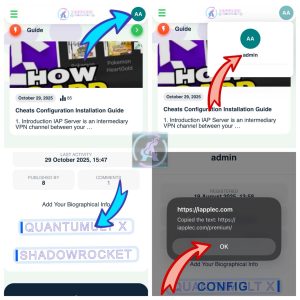
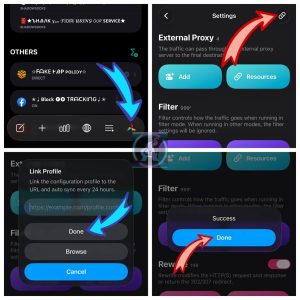
Paste the copied configuration into Link Profile
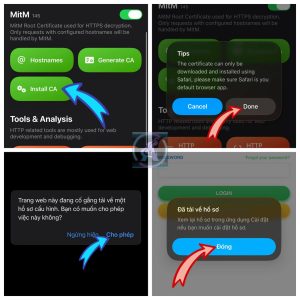
After entering the configuration, you run to the MITM section.
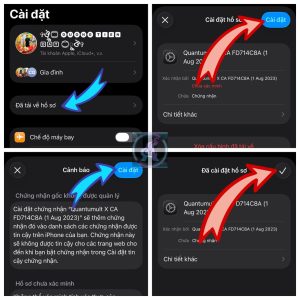
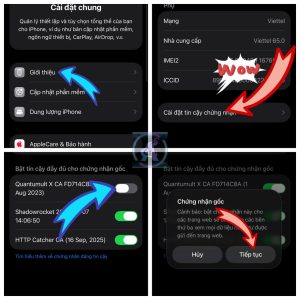
Press the Generate CA button once, then click Install CA, it will open the Safari browser for you to download and install. Go to settings to install it, then go to Settings on iPhone/iPad -> General Settings -> About -> select the CA you just installed and turn it on to trust.
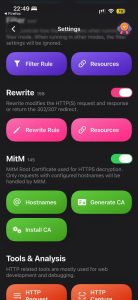
Now go back to the QX application, in the Rewrite and MitM sections, turn on the 2 switches on the right as shown below. (Remember to install the CA above before turning on MitM).
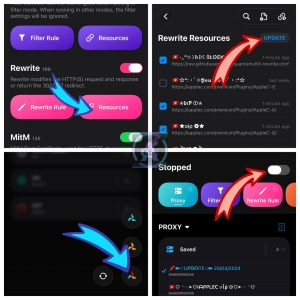
Select Rewrite -> Resources -> Update to refresh the Resources. Then return to the main interface of the Quantumult X application, press and hold for 3 seconds on the 3-wing icon, select Mode Based on Filter (3 different wing colors). Finally, turn on Quantumult X to use the configuration.
 English
  Vietnamese